photo 1_zpsaa2a8b88.png photo 12_zps6e9e0227.jpg photo 2_zpsb94af610.png photo 12_zps6e9e0227.jpg photo 4_zpsa052071c.png photo 12_zps6e9e0227.jpg photo 3_zpsaae10b49.png photo 12_zps6e9e0227.jpg photo up-wga_zpsce97dfa5.png photo 12_zps6e9e0227.jpg

domenica 2 marzo 2014

Manjaro Linux 0.8.9_x86/64 bit


Manjaro is a user-friendly Linux distribution based on the independently developed Arch operating system. Within the Linux community, Arch itself is renowned for being an exceptionally fast, powerful, and lightweight distribution that provides access to the very latest cutting edge – and bleeding edge – software. However, Arch is also aimed at more experienced or technically-minded users. As such, it is generally considered to be beyond the reach of those who lack the technical expertise (or persistence) required to use it.


Developed in Austria, France, and Germany, Manjaro provides all the benefits of the Arch operating system combined with a focus on user-friendliness and accessibility. Available in both 32 and 64 bit versions, Manjaro is suitable for newcomers as well as experienced Linux users. For newcomers, a user-friendly installer is provided, and the system itself is designed to work fully ‘straight out of the box’ with features including:
Pre-installed desktop environments
Pre-installed graphical applications to easily install software and update your system, and
Pre-installed codecs to play multimedia files
For more experienced – and adventurous – users Manjaro also offers the configurability and versatility to be shaped and moulded in every respect to suit personal taste and preference. Furthermore, a minimalist NET-Edition is also available in both 32 and 64 bit versions. Stripped of any pre-installed software, this provides a base installation on which to build your own system; starting from a command line, be completely free to chose your own greeters, desktops, hardware drivers, software applications, and so on!
Features:
Manjaro shares many of the same features as Arch, including:
Speed, power, and efficiency
Access to the very latest cutting and bleeding edge software
A ‘rolling release’ development model that provides the most up-to-date system possible without the need to install new versions, and
Access to the Arch User Repository (AUR).
However, Manjaro boasts a few extra features of its own, including:
A simplifed, user-friendly installation process
Automatic detection of your computer’s hardware (e.g. graphics cards)
Automatic installation of the necessary software (e.g. graphics drivers) for your system
Its own dedicated software repositories to ensure delivery of fully tested and stable software packages.
Support for the easy installation and use of multiple kernels.
[Author's Note]
http://adf.ly/eGe4t

 http://adf.ly/eGe8x

Free Windows Repair (All In One) v. 2.4.2+portable

http://adf.ly/IV5Tj

Repair di Windows (All In One)
Tweaking.com - Windows Repair è uno strumento di riparazione all-in-one per aiutare a risolvere la grande maggioranza dei noti problemi di Windows, tra cui errori di registro e file di
autorizzazioni nonché problemi con Internet Explorer, Windows Update, Windows Firewall e altro ancora. Malware e programmi installati possono modificare le impostazioni predefinite. Con Tweaking.com - Windows Repair è possibile ripristinare le impostazioni originali di Windows.
Il programma è ancora giovane e ha bisogno di crescere.
Il mio obiettivo è quello di avere uno strumento di riparazione che può salvare qualcuno da dover fare una reinstallazione.


Per aiutare coloro che non possono permettersi un tecnico di computer, e naturalmente per aiutare i miei compagni di tecnici là fuori.
Quindi, se avete problemi, idee di riparazione o suggerimenti per migliorare il programma si prega di postare nel forum e fammi sapere :-)
Per Windows XP, 2003, Vista, 2008, 7, 8, 8.1, 2012 (32 e 64 bit)
[Nota dell'Autore]

http://adf.ly/IV5Tj

venerdì 28 febbraio 2014

UI.Win Metro for XP,Vista,Seven-Free_Multilang

http://adf.ly/IX0DG

http://adf.ly/IX07b

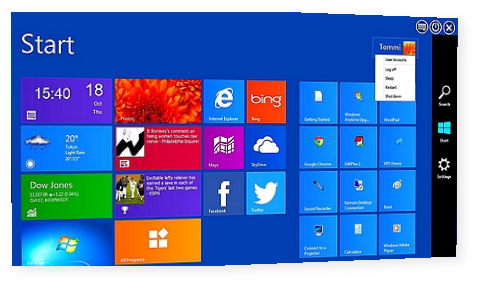
WinMetro è appositamente progettato per portare la recente introduzione di Windows 8 Metro UI di Windows 7 , Windows Vista e Windows XP .
WinMetro è appositamente progettato per portare la recente introduzione di Windows 8 Metro UI di Windows 7 , Windows Vista e Windows XP . Esso offre una soluzione facile per vecchia versione utenti Windows di provare e godere la piastrella in base Metro UI . Con la visualizzazione di informazioni utili come meteo, calendario, notizie , le scorte , e dei programmi utilizzati di frequente , si trasforma il desktop in una postazione di lavoro informativo e produttivo . Offre anche la possibilità di avviare alla schermata Metro Avvio direttamente .


Altro info
È ora possibile ottenere widget che mostra  informazioni animate utili in tempo reale , come previsioni meteo , calendario , notizie , le scorte e molto altro.
più produttivi
L'accesso ai programmi più frequentemente utilizzati strumenti di sistema e di recente apertura diventa più facile e più veloce , risparmiando tempo durante il funzionamento o il surf .
Quicker Ricerca
Esatta corrispondenza in specifico percorso di ricerca riduce il tempo impiegato nella ricerca e rende il vostro lavoro più efficiente .
[ Nota dell'autore ]

http://adf.ly/eCWgU

giovedì 27 febbraio 2014

Re Activator_Back Up and Restore XP Activation

http://adf.ly/e9JME

Il Riattivatore di Windows consente di eseguire il backup e il ripristino dello stato di attivazione di un impianto già attivato di Microsoft ® Windows XP. Nonostante quello che molti siti web che puntano a questa pagina dire, questa applicazione non funzionerà su qualsiasi altra versione di Windows . Questo programma non eludere l'obbligo di attivazione di Windows!


Versione attuale
La versione più recente di Windows Riattivatore è 1.1
File inclusi nel download
Reactivator.exe - programma eseguibile principale
ReadMe.txt - Leggimi File
license.txt - Noia software freeware License
Installazione
Il Riattivatore non richiede installazione. Per utilizzare Riattivatore, è sufficiente estrarre il file eseguibile principale e fare doppio clic su di esso. L'uso di Riattivatore richiede privilegi amministrativi locali.
Problemi
Nessuno noto.
Command Line Parameters
Parametro: / ignore
Effetto: Ignora la modalità di avvio rilevato (safe mode / modalità normale) e mostra entrambe le serie di controlli
Parametro: / forcenormal
Effetto: Ignora la modalità di avvio rilevato (safe mode / modalità normale) e mostra i normali controlli di modalità
Parametro: / forcesafe
Effetto: Ignora la modalità di avvio rilevato (safe mode / modalità normale) e mostra i comandi Modalità Protetta
Nota: I parametri non sono impilabili. Se più di un parametro viene passato, e / ignore parametro non è uno di loro, poi il primo parametro sarà onorato, mentre i restanti parametri vengono ignorati. Se / ignore è passato ovunque nella stringa argomento, quindi il / ignore parametro ha la precedenza. Parametri non riconosciuti vengono ignorati.
[Note dell'Autore]

http://adf.ly/e9JME

martedì 25 febbraio 2014

Ccleaner Pro v.4.11.4619-32/64-Multilang_portable

http://adf.ly/e4bVw

CCleaner
Ottimizzazione e pulizia
CCleaner è il numero-uno strumento per pulire il PC Windows. Esso protegge la tua privacy online e rende il vostro computer più veloce e più sicuro. Facile da usare .


Ccleaner Pro v.4.110.4619-32/64-Multilang_portable by Paulo Tabarez


Cleans all areas of your Computer
Internet ExplorerInternet Explorer
Temporary files, history, cookies, Autocomplete form history, index.dat.
FirefoxFirefox
Temporary files, history, cookies, download history, form history.
Google ChromeGoogle Chrome
Temporary files, history, cookies, download history, form history.
Opera
Temporary files, history, cookies.
Apple Safari
Temporary files, history, cookies, form history.
Windows
Recycle Bin, Recent Documents, Temporary files and Log files.
Registry Cleaner
Advanced features to remove unused and old registry entries.
[Author's Note]


http://adf.ly/e4bVw


Free-System Rescue Live cd-x86-4.0.1

http://adf.ly/e3cnC

Cosa è SystemRescueCd
 SystemRescueCd è un disco di ripristino del sistema Linux disponibile come CD-ROM o chiavetta USB per amministrare o riparare il sistema ei dati dopo un crash. Esso mira a fornire un modo semplice per svolgere compiti di amministratore sul computer, come la creazione e la modifica delle partizioni del disco rigido. Viene fornito con un sacco di software linux come strumenti di sistema (parted, partimage, fstools, ...) e strumenti di base (editors, midnight commander, network tools).


 Può essere utilizzato sia per Linux e computer Windows, e sui desktop ei server. Questo sistema di salvataggio richiede alcuna installazione in quanto può essere avviato da un drive CD / DVD o chiavetta USB, ma può essere installato sul disco rigido se lo si desidera. Il kernel supporta tutti i principali sistemi di file (Ext2/Ext3/Ext4, reiserfs, btrfs, XFS, JFS, VFAT, NTFS), così come filesystem di rete (samba e NFS).

http://adf.ly/e3cnC

lunedì 24 febbraio 2014

BitKiller 1.3_file shredder-Portable

http://adf.ly/dzuQq

Secure File Shredder
BitKiller is a small and simple file shredder that you can use to securely delete your sensitive files so that they cannot be recovered with common data recovery products.
In addition to simple overwrites (low level security), the program supports DoD3, DoD7 and Gutmann algorithms, which are more time consuming but offer multiple overwrites for high level security requirements.


    BitKiller 1.3

by Hasan N. Genc

1) How does BitKiller work?

    First, the file to be shredded is overwritten using whichever method
    the user chose. Next, the file is truncated to zero size. It is then
    renamed randomly ten times. Finally, the file is deleted.

2) Why has BitKiller failed to shred a certain file or folder?

    Sometimes, Windows' security features restrict BitKiller's permission
     to shred, overwrite, or delete certain files and directories. Try
    right-clicking on BitKiller.exe and selecting "Run as administrator".
    This will usually solve the problem.

3) I'm receiving an error message telling me my computer requires msvcp100.dll/msvcr100.dll/any other .dll file to run BitKiller.

   requires the free Microsoft VC++ redistributable package from
 
4) Should I always use the Gutmann method?

    No. The Gutmann method was designed for an encoding that modern hard
    disks do not use. Using the Gutmann method is not only usually
    unnecessary, it is also very slow compared to the other methods and
    is not likely to be substantially more effective.


http://adf.ly/dzuQq


======================
    CREDITS
======================

Programming, GUI design:
    Hasan Nazim Genc
    hgenc55@yahoo.com

Fire icon:
    Fatcow Web Hosting
    http://www.fatcow.com/free-icons

Page icon:
    Gnome Project
    http://art.gnome.org/themes/icon

Special thanks to Sasso for his advice and for discovering that the zero-fill function was overwriting files with 0x30, rather than 0x00.